The Finance Module allows many general ledgers to run under one system. Some accounting information is common to all the ledgers and these are defined through the Set Up option on the menu.
From the
Finance System Screen
,
Set Up
is the global set up for all ledgers, whereas
Ledger , Set Up
is the settings for an individual ledger.
Ledger Set Up
is covered in the next chapter.
When you select Setup from the main menu the following options are available:
Currency
Corporate Exchange Rate
Daily Exchange Rate
Method of Giving
Method of Payment
Analysis Types
Form Design
Define Email Destination
All of the above maintenance procedures are controlled to ensure that the system parameters are defined in the correct way. Some of the procedures are only available as System Administrator functions.
Reports may be produced for any of the details above for any of the ledgers defined on the system.
To add, delete or edit a currency.
-
From the Finance Screen , select
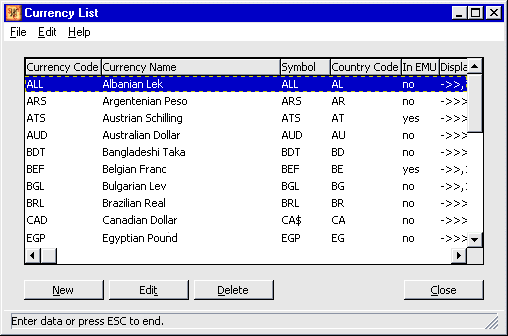
Setup, thenCurrency. The Currency List Screen appears:Currency List Screen
-
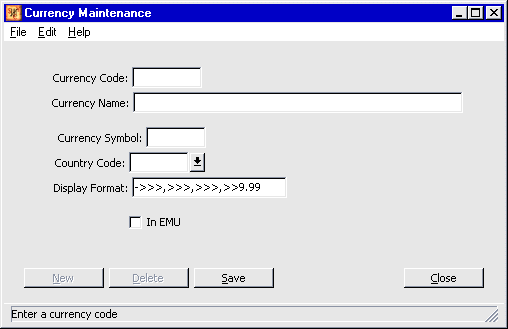
To create a new currency, select New . To edit a currency, highlight it and select Edit . In either case the Currency Maintenance Screen appears. (To delete a currency, see note at the end of this section.)
Currency Maintenance Screen
-
-
Enter the following details:
Currency Code - the three letter code set by the International Standards Office (an outside body)
![[Note]](../common/images/admon/note.png)
Note This code cannot be changed once it has been set up. If you make a mistake, you have to delete the currency (see below) and add a new code.
Currency Name - the name of the currency. This can be edited later.
Currency Symbol - the symbol to be used. This can be edited later.
Country Code - this must already exist in the country file maintained by the partner system, select the arrow key on the right of the box to see the options available.
Display Format – this shows the format in which the currency will be displayed.
![[Warning]](../common/images/admon/warning.png)
Warning Once this has been set up, it can be changed later, but the consequences are serious, so check with your Area IT Administrator before doing this.
Use the following symbols
9
means that a digit will be displayed, even if zero
>
will suppress a leading zero
-
means that this can be negative
It is not possible to change the use of full stop and comma (“.” “,”) for decimal point and separator for thousands on this screen. This needs to be set up by the System Administrator (see ‘Number format’ in the SYSTEM MANAGER GUIDE
In EMU select this box if this currency is part of the European Monetary Union
-
When you have entered the details correctly, select Save .
Now you can either add another code, delete the one you have just entered, or close and return to the Currency List Screen .
A currency can only be deleted if it is not the base currency for any ledger and the currency is not being used by any transactions on the system.
-
In the Currency List Screen , highlight the currency you wish to delete.
-
Select Delete . Then confirm the deletion by selecting Yes in the dialogue box.
You can customise the way that a currency amount is displayed as text. You need only set up the currency and language combinations that you use in your office if you need to display an amount in words on a receipt. If you set this option up to use a language that is not yet supported by PETRA, then it will default to English.
To set up a currency language, follow these steps:
-
From the Currency List Screen highlight the currency you require
-
From the menu bar at the top of the screen, select
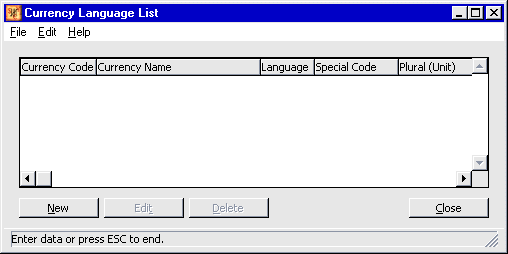
EditthenLanguage Options. The Currency Language List Screen appears:Currency Language List Screen
-
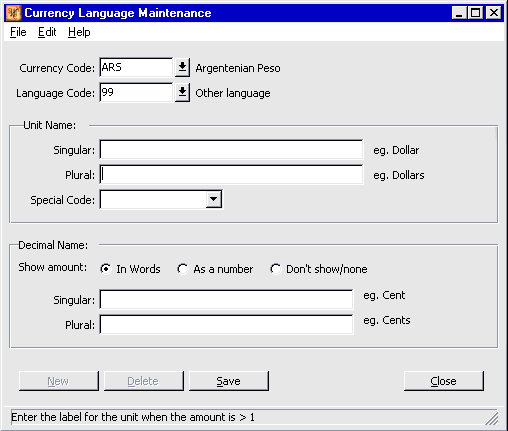
Select New . The Currency Language Maintenance Screen appears:
Currency Language Maintenance Screen
-
Select the Currency Code for the currency you are defining.
-
Select the Language Code you require.
-
Unit Name Enter the description for the unit of currency, in the singular and the plural.
-
Special Code Select this, if required, to show if the word for the currency unit is masculine or feminine in the language. (This may be used in setting up an installation for a country.)
-
Decimal Name Then determine how you want to show the decimal places of the currency, whether in words, as a number, or not at all. If you choose to not show the decimal part, then the amount will be truncated, not rounded to the nearest whole number.
Then enter how it is to be shown in the singular and the plural -
Then select Save .
The Corporate Exchange Rate is used to produce reports in US Dollars, the OM International Currency.
PETRA needs a rate for the 1st of the month before transactions for that month can be entered. Only one rate is entered for each month.
The Corporate Exchange Rate is set by the International Clearing House Manager at the beginning of each month. When you receive the rate for the month you should enter it here, backdating it to the first of the month. If you have already entered transactions for this month, use last month’s rate until you enter the new rate, then the transactions will be recalculated using the new rate.
When you set a rate, set the rate from US Dollars to your base currency. PETRA will then calculate the reciprocal rate for you, you must not enter it.
To enter or edit a Corporate Exchange Rate, follow these steps. (To delete a rate, see separate note at end of this section.)
-
Select
Set UpandCorporate Exchange Rate, then the following screen appears: -
Select
Newto input a rate. To edit an existing rate, highlight it, and click Edit . The following
screen appears: -
Enter (or amend) data as follows:
The From Currency Code should be US Dollars and the To Currency Code should be your base currency for your ledger.Then enter the date for which the rate applies, enter the 1 st of the month.
Then enter the Rate of Exchange as supplied by the International Clearing House Manager.
Then use the <Tab> key to view and check the rate. -
Then select Save .
The formula used for the conversion rate is:
Rate = From currency
To currency
The exchange rate cannot be modified or deleted if a posted transaction already exists using that rate. If an unposted transaction already exists using that rate, then you will be given the option to change the rate and apply it to all transactions or update each transaction with a new rate.The Daily Exchange Rate is used when you input transactions in a foreign currency. For example, if you deposit a foreign currency into your bank account you may want to input the rate of exchange given by the bank for that transaction, and when inputting the journal, the daily exchange rate would be used.
When you set a rate, set the rate from the other currency to your base currency. PETRA will then calculate the reciprocal rate for you; you must not enter it.
When entering the Daily Exchange Rate it will default to the most recent daily exchange rate entered. If you are entering a rate to US Dollars (the International currency), then, if there has been no daily exchange rate entered during the accounting period, it will default to the Corporate Exchange rate for the month.
If you are using the ICH conversion rates to calculate your exchange rates, then to get the rate to enter into PETRA, use the formula:
rate for your base currency to USD
rate for the other currency to USD
