- 1.2.1. Who are Partners?
- 1.2.2. People (Families and Persons!)
- 1.2.3. Where do partners live?
- 1.2.4. Keeping in touch
- 1.2.5. Partners aren't all the same
- 1.2.6. Personnel - Joining a team
- 1.2.7. Conferences and Campaigns
- 1.2.8. Organising a Conference
- 1.2.9. Different sorts of Unit
- 1.2.10. Finance - Looking after the Money
In this section we will paint a picture of what Petra does. This will not tell you anything about how to use Petra, but it will introduce some of the key ideas and terms used in Petra.
Petra is just a tool to help manage the data used by the different offices that form part of an Organisation. The idea is that each office is basically independent, but by using the same tools, it is easy to exchange information.
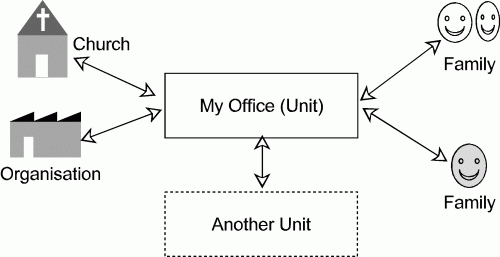
Let's look at an office. Nothing happens without relations with other people and groups, and in Petra, everyone that the office deals with is called a Partner . Partners may be people or organisations. In fact Petra uses several different classes of partner, since slightly different data needs to be stored for each. People are the most common, and we look at them below. Two of the classes, churches and organisations are fairly obvious (organisations include companies that we buy items from). Another common class of partner is a Unit , a term used to refer to the internal sub-divisions or offices of the Organisation. Your office is a Unit, and it will exchange information with other units.
Finally we have people - the largest group of partners. The reason we left them until last is that people are more complicated than you might think! With many people, for example a married couple who support the Organisation, we only need basic information, like name, address and a record of donations. We treat the couple as one, and we call them a partner of class Family . Petra uses this term, Family , even if the supporter is a single person.
|
Figure 1-1 The main classes of Partner. Family is used as the main record for people, even if they are a single person |
|
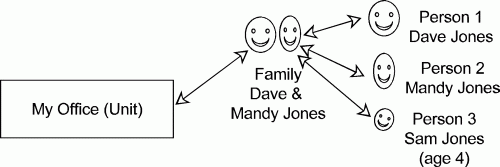
However, in some situations, we need to record individual information, such as date of birth , gender , etc, which cannot apply to a couple. Petra does this by using a fifth class of partner record, known as class Person . However, a Person record is only used for additional information; it is not the main record of the partner's address etc.
|
Figure 1-2 David and Mandy Jones have individual Person records linked to a joint Family record (and so does Sam.) |
|
Person records are always linked to a Family record , so in the case of a couple, there will be two person records linked to one Family record. If they have children, there will be more. The Family Identification or Family ID number is used to keep track of the different person records linked to a family.
Sometimes Partners cease to interact with the Organisation. However, we cannot delete them, because their records may be required for financial reasons, for example if they have given a donation in the past. To manage this Petra uses the idea of Partner Status . Most partners will be of status Active , but they may be Retired , or Deceased .
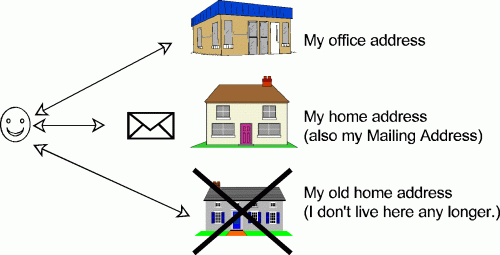
We must record a partner's address , so that we know how to contact them. However, they may have more than one address - for example a private address and an office address. Petra stores addresses separately from partners, and calls them locations . One partner can have several address locations. However, we need to know which address to send any mail to, and so we make one address the Mailing Address .
|
Figure 1-3 Petra has 3 addresses recorded for this partner, but only one is the Mailing Address. |
|
Of course sometimes two or more partners may share the same address, even if they are not members of the same family (for example, several members of a team may share a house). Petra lets you use the same address for a number of different partners.
Many supporting partners want to receive newsletters, but which ones? There may be several different types of newsletter
or magazine, and these are called
publications
. You can set up
subscriptions
to publications; these are called subscriptions, even if you do not have to pay for them. Petra will keep a list
of everyone who receives a particular publication, and will help you print mailing labels to send them out.
Of course an office may want to send special letters to groups of partners, and it is necessary to keep track of
who received which mailing. To do this Petra lets you set up
Mailing Codes
to record a particular mailing event (such as sending an invitation to a particular meeting.) However, there may
also be many more
ad hoc
contacts with individual partners, by letter, phone or e-mail, and you can also enter a record of these
Contacts
for future use. You can also set up
Reminders
so that Petra reminds you to contact a partner at some future date.
Sometimes it is useful to record relationships which partners have with each other. It is possible to record, for
example that a church partner is a supporter of a member partner. These
Relationships
can be recorded between any two partners, and they are not the same as the family relationships set up between an
individual (person) and a family record.
As mentioned, it is often necessary to contact a group of partners of a particular type. How can we distinguish them? Petra lets you record a partner of as being of a Special Type (or several Special Types); so, for example, an individual partner might be a Board member of the Organisation, and a Pastor, and a Former Member (3 Special Types).
Of course, when mailing a whole group of partners, we need a means of grouping them. Sometimes we want to contact everyone who lives in a certain area, or everyone who has given a donation within the last 3 months, or who is a Pastor. You can create Extracts , which are just lists of partners and their mailing addresses to use for such purposes, and there are many ways to identify them. You may want to send a similar letter to every member of one of these groups, but to include each partner's particular details. Petra can produce such 'mail merge' letters, which are called Form Letters .
|
Figure 1 4 Extracts are groups of people with something in common, like a Special Type |
|
People join the Organisation in two main ways. Some send in a short-term application to take part in a particular short-term Campaign , while others send in a long-term application to join the Organisation for a longer period. People will apply to their Sending Field (normally in the country where they live), but will work in a Receiving Field , often, but not always, in a different country.
|
Figure 1 5 Applications are always made to the Sending Field, normally the office in the country where the applicant lives |
|
Petra helps the Sending Fields process these applications. In both cases it is necessary to enter a lot more Personnel Data (for example passport number, driving licence details, etc). You can also record an individual's professional areas , abilities , language skills , special needs (dietary or medical) etc.
When people join the organisation for a longer period of time need (as the result of a long-term application), it is important to record the exact dates that they will be joining a particular Unit (in this case a Field Office.) Petra does this by creating Commitment Records that give the start and finish dates.
Short-term campaigns usually have a Conference for the first few days, and people joining long-term also attend a conference. Campaigns and conferences are often called Events in Petra. Application details include travel details , such as arrival and departure times. Some people have a special function at a conference or campaign, such as team leader, and these are called Event Roles .
Someone needs to co-ordinate all the applications to a particular campaign, and so home offices need to export details of all the partners who have submitted applications to the relevant organiser. Petra lets you export all the relevant information into a file, which can be sent to the organiser, who then imports it into his/her system.
|
Figure 1 6 Short-term campaigns often start with a conference. The Home Offices of participants must export the applications to the Conference Organiser. |
|
After a conference or campaign, Petra can record that an individual has taken part in that event by creating a record of Previous Experience .
Actually organising a conference can be quite complicated, and so Petra has a Conference Management module to help. The organiser can set up the conference costs , including any discounts for children, staff members, etc. The organiser can also set up a Venue , which includes details of the rooms available for accommodation at the conference site. After setting up the conference, the organiser can then load the attendees into the Conference Management System. You can then assign attendees to rooms for sleeping accommodation, and to work groups , etc. When the conference actually begins, Petra can record arrival and departure times , print badges and help with arranging local transport . Finally it can arrange for appropriate invoices to be produced for the other various unit offices who sent people to the conference.
By the way, conferences and campaigns are actually treated by Petra as a special sort of Unit. However, Units generally refer to the Home and Field Offices, mentioned above. These offices are actually grouped into areas, and there is a Unit Hierarchy showing which offices report to which others within the Organisation. For each Unit it is possible to define Job Positions , that is the sorts of jobs and number of people that are needed. The jobs can be described according to the Job Abilities , Job Qualifications , etc needed for that job. It is also possible to record that an individual person has been assigned to fill one of these positions, using the Job Assignment procedure.
A major part of Petra is the Finance module for keeping the Organisation's accounts. Many Offices (Units) will use just one Ledger , for their own fund. Because the Organisation works with people from many countries, Petra's finance system can handle multiple currencies. Many transactions are entered in the General Ledger . Several separate Transactions are entered together in a Journal . A number of Journals are then entered in a Batch , and finally, when everything is ready, the Batch is Posted (which means that it is stored permanently in the system.)
Gifts are entered into the Gift Entry or Gift Receipting system, which automatically posts them to the General Ledger. The Gift Entry system allows you to enter the reason that the gift was given, and the use to which it should be put (called the Motivation .) Receipts will be sent to the donor for every gift, or at intervals as requested, and known as the receipt frequency .
|
Figure 1 7 Petra's Gift Entry system allows the donor to say where they wish the gift to go (the Motivation). |
|
Finance works on a monthly cycle; when all batches relevant to a month have been posted, the Month End Closing procedure is completed. The closing automatically generates a number of reports. There is also a Year End Closing procedure.
£ -> $ -> € -> ¥ -> ?
Because there are many offices working in different currencies, it is necessary to control the foreign currency exchange. Otherwise there is a risk that one office is changing pounds sterling to US dollars, while another unit is changing US dollars to pounds, therefore losing money in the exchange. To do this in the most efficient way possible, each month the International Clearing House (ICH) receives an ICH Stewardship Report from the Petra system of each office, and consolidates the currency transfers in the most efficient manner.
Linked to the General Ledger is a system known as Accounts Payable . This is used to record all invoices received and the dates they are due. It can also be used to print cheques and record payment.
